Diagnostics & Error Handling
latex_it parses raw compiler logs from xelatex, lualatex, and pdflatex to present clean, categorized diagnostic messages. Instead of wading through hundreds of lines of TeX console output, errors and warnings are categorized into clear tiers with actionable remediation hints.
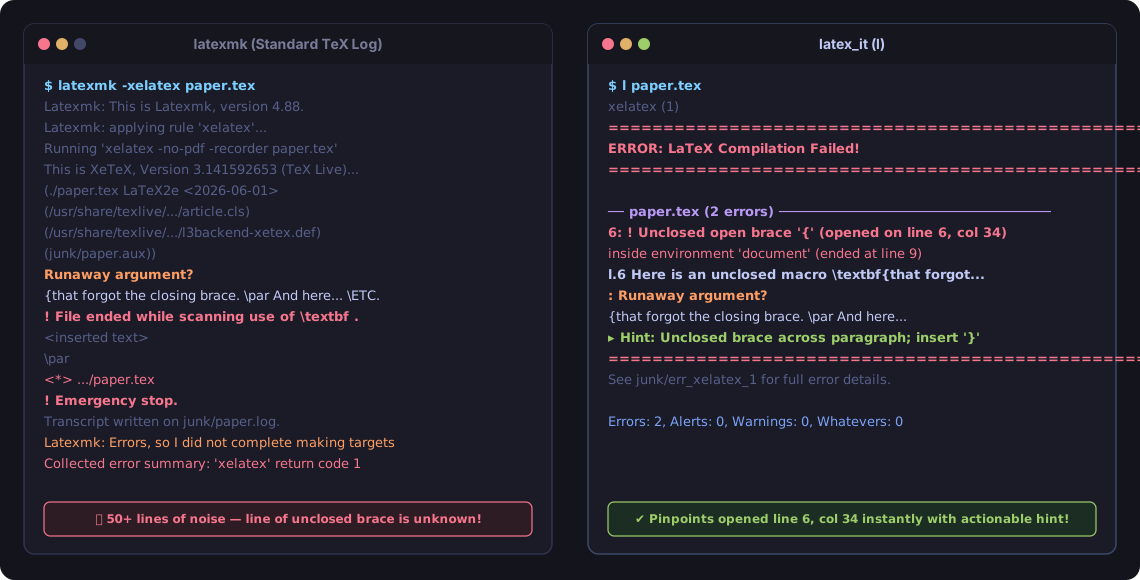
See the Diagnostic Showcase Gallery for more side-by-side comparisons on real errors.
1. The 4-Tier Diagnostic Hierarchy
Diagnostics are organized into four severity levels:
┌────────────────────────────────────────────────────────┐
│  Errors     Compilation failures (syntax, missing file)│
│  Alerts     Structural flaws & large overfull hboxes   │
│  Warnings   Standard typesetting & citation warnings   │
│  Whatevers  Harmless noise (suppressed by default)     │
└────────────────────────────────────────────────────────┘
| Tier | Description | Examples | Default Behavior |
|---|---|---|---|
| Errors | Hard compilation failures that prevent PDF generation. | Syntax errors, undefined commands, runaway arguments, missing packages. | Highlighted in red; suppresses lower tiers so the root failure is immediately visible. |
| Alerts | Serious structural issues or major layout defects. | Multiply-defined labels, overfull \hbox $\ge 24\text{pt}$, inverted labels before captions. |
Highlighted in yellow/bold; always displayed. |
| Warnings | Actionable layout and reference issues. | Overfull \hbox ($2.5\text{pt} < \text{pt} < 24\text{pt}$), underfull \vbox, undefined references, missing citations. |
Displayed in normal output. Deduplicated per line. |
| Whatevers | Minor cosmetic noise with negligible visual impact. | Micro overfull \hbox ($\le 2.5\text{pt}$), hyperref bookmark token removals, font substitution notices. |
Suppressed from output; total count reported in the summary line (Whatevers: N (suppressed)). |
Why “Alerts” and “Whatevers”?
Standard LaTeX has an all-or-nothing philosophy: either a run halts on a fatal syntax error, or it succeeds with exit code 0. Everything else is dumped into a single undifferentiated stream of Warning lines.
latex_it introduced Alerts and Whatevers to solve the two opposite failure modes of this model: Silent Corruptions (False Negatives) and Warning Fatigue (False Positives).
What Are “Alerts” (and Why Do They Matter)?
Alerts represent silent fatal flaws — bugs where LaTeX happily exits with code 0 and produces a PDF, but the document’s content, references, or layouts are fundamentally corrupted.
Standard tools like latexmk treat these as clean builds because the compiler did not crash. Authors routinely submit papers with these bugs without realizing it.
Key Examples of Alerts:
- Inverted
\labelBefore\caption: Placing\label{fig:myfig}before\caption{...}in a figure or table causes the cross-reference to secretly bind to the enclosing section number rather than the figure number. In the published paper, “as seen in Figure 3” will literally render as “as seen in Figure 1” because Section 1 was current when the label was defined! - Severe Overfull
\hbox($\ge 24\text{pt}$): When an unhyphenated word, inline URL, or wide equation overflows the page margin by $8.5\text{mm}+$ ($1/3\text{rd}$ of an inch), text gets visibly clipped off the edge of the printed page. - Multiply-Defined Labels: Having two different sections or equations share the same
\label{eq:bound}causes TeX to silently resolve citations to whichever happened to compile last. - Type 3 (Bitmap) Fonts: Low-resolution raster fonts embedded in the PDF that cause automatic rejection by journal submission portals (IEEE PDF eXpress, ACM TAPS).
How latex_it Handles Alerts:
- Displayed in high-visibility bold yellow/orange banners.
- Always shown, even when minor warnings are suppressed.
- If run with
-W/--werror, Alerts causelatex_itto exit with a non-zero status, preventing broken PDFs from being uploaded to arXiv.
What Are “Whatevers” (and Why Are They Not Important)?
Whatevers represent harmless compiler chatter — low-level internal TeX notices that have zero or sub-pixel impact on the rendered document, but create immense “warning fatigue” that drowns out real problems.
Key Examples of Whatevers:
- Micro-Overfull Lines ($\le 2.5\text{pt}$): TeX’s hyphenation algorithm is mathematically rigid. An overfull hbox of $1.5\text{pt}$ represents an overflow of $0.53\text{mm}$ ($1/50\text{th}$ of an inch) — completely imperceptible to the human eye and universally accepted by every academic publisher.
- Hyperref Bookmark Token Stripping: When a section heading contains inline math (e.g.
\section{An $O(n \log n)$ Bound}),hyperrefprints warnings (Token not allowed in a PDF string (Unicode)).hyperrefalready safely strips the math macro to write clean plain text into the PDF bookmarks outline. - Font Substitution Notices: Informational kernel notes where LaTeX safely substituted a compatible font variant.
Why They Are Not Important:
- Spending hours trying to rephrase sentences to eliminate a $0.8\text{pt}$ line overflow is wasted effort that does not improve the paper.
- Pages of harmless micro-warnings cause authors to ignore the terminal entirely, making them miss broken citations and inverted labels.
How latex_it Handles Whatevers:
- Suppressed by default: Kept out of your terminal so you can focus 100% on genuine text and layout issues.
- Counted in the summary line: Always visible at the end of compilation (
Whatevers: 3 (suppressed)). - Inspectable anytime (
l -a): Runningl -a(or--all) instantly unhides all Whatevers in cyan. - Configurable threshold: Set your own tolerance with
--whatever-pt <pt>(e.g.1.0) or in.l.jsonc.
2. Explanation Mode (-x / --explain)
Pass -x or --explain to print a boxed, plain-English explanation on the first occurrence of each diagnostic type:
l -x paper.tex
Example explanation box:
┌─── [Why: Overfull \hbox] ──────────────────────────────────────────┐
│ Text on this line extends beyond the printable margin boundary.    │
│ Fix: Rephrase the line, add hyphenation hints (\-), or wrap in     │
│ \sloppy / \begin{sloppypar} if necessary.                          │
└────────────────────────────────────────────────────────────────────┘
Explanations appear at most once per error type to keep terminal output compact.
3. Threshold Configuration
You can customize the threshold boundaries between Whatevers, Warnings, and Alerts via CLI flags or .l.jsonc:
# Set overfull hbox alert threshold to 30pt
l --alert-hbox 30.0

# Set micro-overflow whatever threshold to 1.0pt
l --whatever-pt 1.0
In .l.jsonc:
{
  "alert_overfull_pt": 30.0,
  "whatever_pt": 1.0
}
To see all diagnostics without any filtering, use -a / --all:
l -a paper.tex
4. Proactive Semantic Checks
latex_it includes proactive checks that catch subtle bugs before or during compilation:
Inverted \label Before \caption
In LaTeX floats (figure, table), placing \label{...} before \caption{...} causes the label to bind to the outer section counter instead of the figure number. latex_it flags inverted labels with an Alert.
Type 3 (Bitmap) Font Detection
Journals and indexing services (ACM TAPS, IEEE PDF eXpress, arXiv) often reject PDFs containing Type 3 raster fonts. When pdffonts is available, latex_it checks the compiled PDF and reports the specific pages where Type 3 fonts appear.
Pre-Flight Brace Auditing
The built-in brace checker (LaTeXBraceChecker) runs before LaTeX starts, catching unmatched {, }, and mismatched brackets like {] across environments without waiting for a full compiler run.
Bibliography Source Pinpointing
When LaTeX crashes during \printbibliography or \bibliography due to a syntax error in a .bib file (such as an unescaped _ or &), standard TeX engines only report \printbibliography in main.tex. latex_it hooks BibLaTeX’s entry processing, intercepts the active citation key, locates the entry and line in your .bib databases, and emits a companion error with line number and token hints. See Troubleshooting Bibliography Errors for details.
5. GNU Standard Compiler Mode (-cc / --compile) & Editor Integration
For standard compiler integration with editors, IDEs, and build runners (e.g. Emacs M-x compile, Vim :make, VS Code tasks, CI log matchers), latex_it provides the -cc / --compile flag.
Format Specification (GNU §4.4)
Diagnostics are emitted directly to $stderr in standard GNU format:
sourcefile:lineno:column: severity: message
- Ordering: Diagnostics are output in stream encounter order (the order they occurred during compilation), not sorted by severity tiers.
- Severity Mapping:
errors$\rightarrow$error:alerts$\rightarrow$warning: [alert]warnings$\rightarrow$warning:whatevers(shown when-ais passed) $\rightarrow$note:
- Clean Message Text: Lowercase starting character, no trailing periods, and source paths formatted relative to the compilation directory.
- Clean Build Silence: Completely silent on success with 0 warnings (exits 0 with no stdout/stderr output).
- No TUI Clutter: Suppresses decorative frames, file headers (
── file.tex ──), box explanations, and summary tallies.
# Standard compilation run (shorthand -cc or --compile)
l -cc paper.tex

# With color explicitly enabled
l -cc --color paper.tex

# Include low-severity whatevers as 'note:' diagnostics
l -cc -a paper.tex
For AUCTeX or editors parsing raw TeX parenthesized file-tracking blocks:
# Emit AUCTeX-compatible error output
l --emacs paper.tex
[!NOTE]
--compileand--emacsrepresent different integration formats and are mutually exclusive.
6. AI Agent & LLM Mode (-llm / --agent) and Structured JSON (--json)
Autonomous AI coding agents (Claude Code, Antigravity, OpenCode, Cursor, Aider) interact with build systems through terminal execution. Standard TeX output wastes tokens, floods context windows with secondary warnings, and breaks regex log parsers with ANSI escapes.
latex_it provides the dedicated -llm (or --agent) profile tailored for agent interaction:
# Run in token-optimized agent mode
l -llm paper.tex
Key Behaviors of --llm Mode
- Plaintext Guarantee: Zero ANSI color escape sequences (
\e[...]) and zero OSC 8 terminal hyperlinks (\e]8;;...). Plaintext parses cleanly and avoids wasting 15–25 tokens per diagnostic line. - Silence on Clean Success: If compilation succeeds with no actionable diagnostics or if targets are already up-to-date,
latex_itexits0with completely empty stdout and stderr, consuming zero agent context tokens. - Warning Category Folding: When a document has dozens of identical warnings (such as 50 missing citations from an empty bibliography),
--llmdisplays the first 2 occurrences with exactfile:line:coland folds the remaining occurrences into a single summary note:paper.tex:12: warning: [alert] undefined citation 'knuth1984' paper.tex:15: warning: [alert] undefined citation 'lamport1994' latex_it: note: 48 more undefined citations in paper.tex (pass -a to show all) - Suppression of Underfull Boxes: Low-level micro-notes (
whatevers) are suppressed by default unless-ais explicitly passed. - Actionable Unparsed Crash Reporting: When a TeX engine crashes with an unclassified syntax or memory failure,
--llmmode extracts the last 8 lines of the compiler log into a GNU-compliant error block:paper.tex:1: error: compilation failed with unclassified error paper.tex:1: note: compiler log tail: > ! Emergency stop. > <read 2> \relax > l.42 \include{missing}
Structured JSON Mode (--json)
For automated pipelines, programmatic IDE integrations, or external tool bridges, --json outputs a single structured JSON object to stdout:
l --json paper.tex
Example JSON response:
{
  "success": true,
  "exit_code": 0,
  "pdf_path": "paper.pdf",
  "summary": {
    "errors": 0,
    "alerts": 0,
    "warnings": 1,
    "whatevers": 0
  },
  "diagnostics": [
    {
      "file": "paper.tex",
      "line": 42,
      "col": 1,
      "tier": "warnings",
      "category": "undefined_citation",
      "message": "undefined citation 'knuth1984'",
      "token": "knuth1984"
    }
  ]
}
FAQ: Why a CLI Flag Instead of an MCP Server?
- Token Economy: Standard GNU compiler lines take ~75% fewer tokens than JSON-RPC envelopes and nested JSON objects. LLMs are natively trained on compiler outputs and understand them immediately.
- Zero Setup Friction: All serious coding agents have built-in shell execution tools.
l -llmrequires zero configuration files, daemon lifecycles, or port bindings. - Sandbox Compatibility: Agents running inside Bubblewrap (
bws), Docker, or temporary git worktrees runl -llminside their execution sandbox natively. Host-level MCP daemons cannot easily access isolated sandboxes. - Programmatic Bridge: If an MCP tool server is ever required for non-shell chat environments (e.g. Claude Desktop),
--jsonprovides the complete structured backend in a single flag.
7. Error Reference Catalog
For an in-depth catalog of 55 common LaTeX compilation errors, their root causes, and minimal reproducer examples:
- Master Error Index: Catalog of 55 errors categorized by layer (TeX Primitive, LaTeX Kernel, Package).
- Corpus Test Suite: Run
tools/test_error_corpusto verify all 55 reproducers against real LaTeX engines.