latex_it
Website & Documentation • GitHub Repository • Diagnostic Gallery





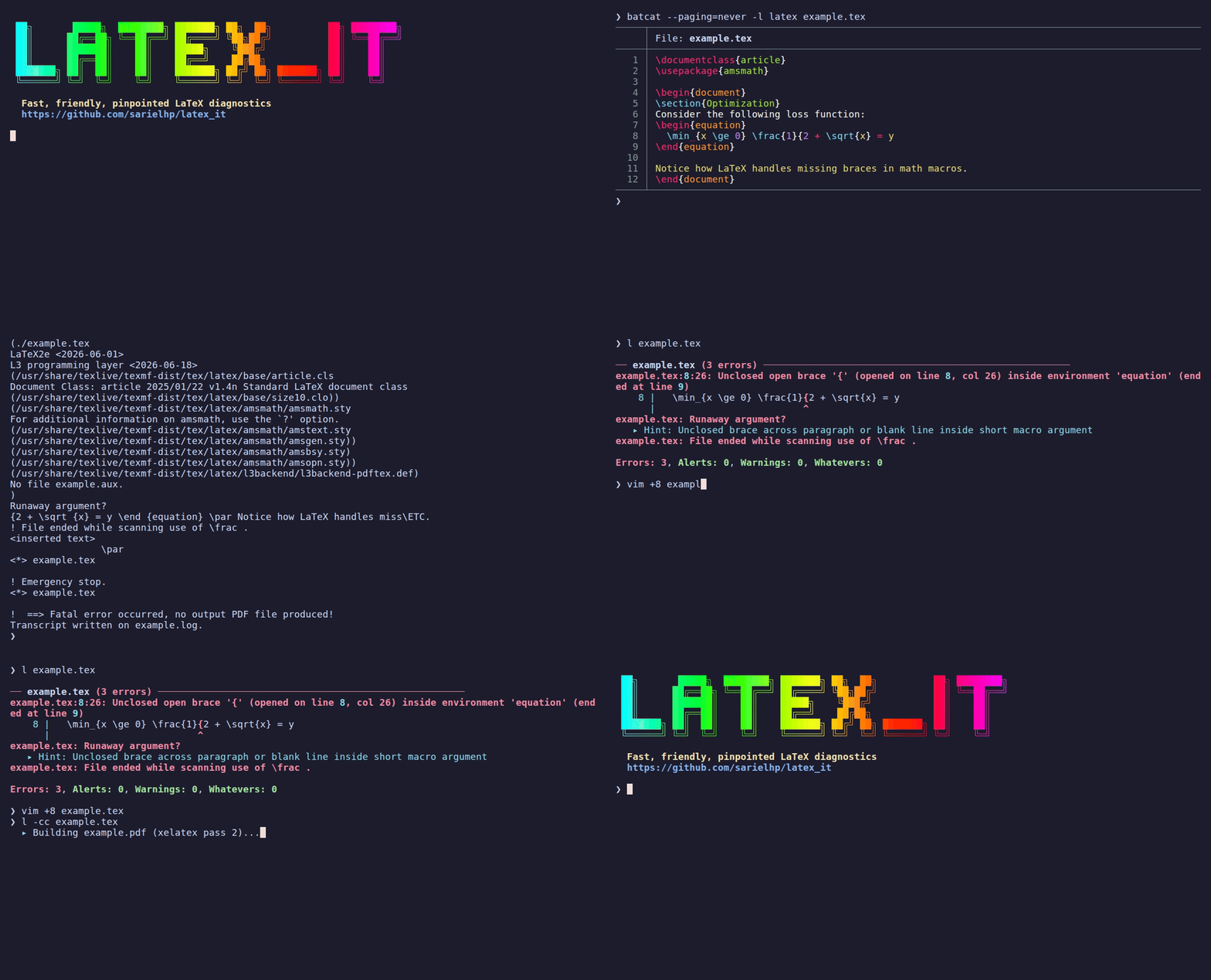
latex_it (invoked as l) brings modern compiler diagnostics (like Rust or Typst) to traditional LaTeX workflows (xelatex, lualatex, and pdflatex), while keeping the workspace clean and fully compatible with arXiv submission.
Like latexmk, it automates multi-pass convergence and bibliography processing, but adds three core architectural differences:
- Directory isolation: Intermediate build files (
.aux,.log,.toc, etc.) are confined to ajunk/directory; only final outputs (.pdf,.bbl,.synctex.gz) remain in the working tree. - 4-tier diagnostic filtering: Separates fatal errors and silent structural corruptions (Alerts) from standard warnings and harmless sub-millimeter layout noise (Whatevers).
- Dual human and agent interfaces: Supports interactive terminal diagnostics with explanatory hints (
-x), strict GNU compiler mode (-cc), and token-optimized plaintext for autonomous AI coding agents (-llm).
Instant Diagnostics vs. Standard TeX Logs
Standard TeX compiler logs bury the root cause under dozens of lines of internal state, often missing the exact line where an unclosed macro or brace began. latex_it intercepts and correlates token streams in real time to pinpoint the source and column immediately:
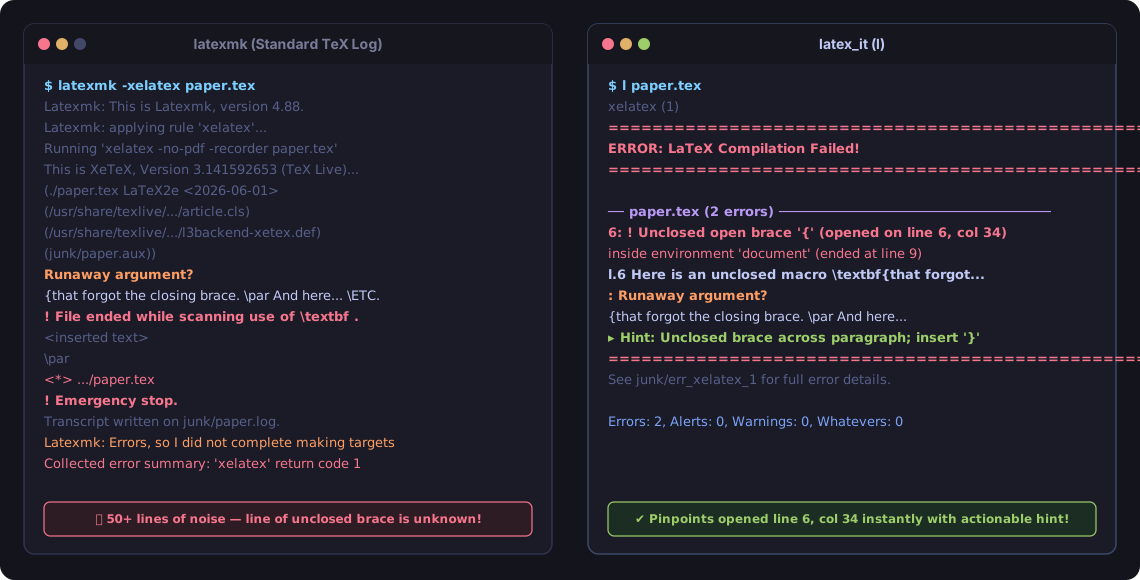
Explore more real-world examples in the Diagnostic Showcase Gallery.
Installation
Standalone Executable (Recommended)
Install the latest standalone binary directly into ~/bin/l (no clone or build required):
mkdir -p ~/bin && curl -sSL https://github.com/sarielhp/latex_it/releases/latest/download/latex_it -o ~/bin/l && chmod +x ~/bin/l
(Ensure ~/bin is in your $PATH.)
From Source
git clone https://github.com/sarielhp/latex_it.git
cd latex_it
./tools/install
(Installs to ~/bin/latex_it along with all shortcut symlinks (l, lw, ll, lp, etc.). Ensure ~/bin is in your $PATH.)
Requirements
- Operating System: Linux (primary target; macOS is supported/functional via Homebrew/MacTeX; Windows requires WSL).
- Ruby: 3.0 or newer.
- TeX Distribution: TeX Live, MacTeX, or compatible (
xelatex,lualatex, orpdflatex). - Optional:
poppler-utils(providespdftotextfor-d/--difftext diffing;brew install poppleron macOS).
Quick Start
Run l inside any LaTeX project directory:
# Finds and compiles the main document automatically
l

# Or specify a file
l paper.tex
Common everyday commands:
lw          # Fast incremental rebuild (reuses cached state)
l -f        # Force a rebuild even if files haven't changed
l -llm      # Token-optimized plaintext build for AI coding agents
l -r        # Print raw compiler output (debug mode)
l -C        # Clean auxiliary and temporary files
l -x        # Show plain-English explanations for errors and warnings
l -B        # Extract cited references into local .bib file
Using with AI Coding Agents (Claude Code, Cursor, Aider, OpenCode)
latex_it provides first-class support for autonomous coding agents. While standard TeX compilers output hundreds of lines of confusing terminal tracebacks that consume context tokens and mislead LLMs, l -llm provides token-optimized, strict GNU compiler output:
- 0 tokens on success: Exits
0silently with zero stdout/stderr on clean builds or up-to-date targets. - Precise line & column diagnostics: Emits exact
file:line:col: error: messageheaders so agents jump straight to the fix. - Warning folding: Automatically collapses 50+ repeated citation or layout warnings into the first 2 instances plus count.
Drop-in configuration for your project’s CLAUDE.md, .cursorrules, or system prompt:
### LaTeX Compilation Rule
When compiling or checking LaTeX documents, always use `l -llm <file>.tex` instead of `pdflatex` or `latexmk`:
- Runs in token-optimized mode (silent on clean build; exact file:line:col diagnostics on failure).
- Confines auxiliary build artifacts to `junk/` automatically.
Key Features
- Standalone executable: Pure Ruby using standard libraries. Distributed as a single file with no gem installation, bundle management, or virtual environment required.
- Directory isolation: All intermediate files (
.aux,.log,.out,.toc,.fls, etc.) remain injunk/. Subdirectories are mirrored automatically. - Automatic detection:
- Resolves root
.texfile if omitted (checks.mainfile, directory name, and\begin{document}). - Selects compiler (
xelatex,lualatex, orpdflatex) via magic comments, loaded packages, or CLI flags. - Detects and runs Biber or BibTeX when citations or
.bibsources change.
- Resolves root
- Deterministic incremental builds: Tracks dependency checksums in
junk/.build_state.jsonand exits in 0 passes when outputs are current. - 4-tier diagnostic filtering:
- Alerts: Highlights structural bugs that exit 0 but corrupt document output (such as an inverted
\labelbefore\captionbinding cross-references to the wrong section, duplicate labels, or large $\ge 24\text{pt}$ overflows). Treated as fatal when-Wis supplied. - Whatevers: Suppresses sub-millimeter layout overflow notices ($\le 2.5\text{pt}$) and Unicode bookmark removals from terminal output, reporting totals in the summary line (
l -ato inspect). See docs/diagnostics.md for details.
- Alerts: Highlights structural bugs that exit 0 but corrupt document output (such as an inverted
- AI agent & LLM profile (
-llm): Plaintext GNU compiler diagnostics (file:line:col: severity: msg) with zero ANSI or hyperlink escapes, silent clean builds (0 bytes on exit 0), warning category folding (collapsing 50 citation warnings to 2 + count), and structured--jsonoutput. - arXiv packaging (
--arxiv): Produces flattened, comment-stripped zip archives verified against an isolated sandbox compiler (see docs/arxiv.md).
Feature Comparison
| Capability | latex_it |
latexmk |
rubber |
Standard IDEs (VS Code / Overleaf) |
|---|---|---|---|---|
| Intermediate file isolation | Automatic (junk/ subdirs mirrored; only .pdf, .bbl, .synctex.gz exported) |
Manual (-outdir; can break relative \input paths) |
Manual (--into) |
Root directory or local .aux clutter |
| Multi-pass convergence | Dependency tracking (.fls) + SHA256 build state (1–3 passes) |
Re-run loop on .log/.aux changes |
Rule-based dependency tree | Fixed passes or background re-compilation |
| Silent structural flaw detection | Alerts: Inverted \label before \caption, duplicate labels, large overflows |
None (exits 0; buried in log) | None (exits 0; buried in log) | None (treated as successful compile) |
| Sub-millimeter noise suppression | Whatevers: $\le 2.5\text{pt}$ overfulls counted in summary, hidden by default | Emits every warning to log | Emits every warning to log | Displays full warning count in problems pane |
AI agent & LLM mode (-llm) |
Built-in: pure plaintext, folded warnings, silent on clean success | None (raw log or verbose stdout) | None | None |
| Structured JSON output | Built-in (--json) |
None | None | Varies (IDE internal API) |
| Submission packaging | Built-in (--arxiv, -z): comment stripping, flattening, sandbox audit |
External scripts required | None | Overleaf export (unflattened zip) |
| Text-diff PDF guard | Optional (--update-if-changed): avoids viewer reload on non-visual edits |
None | None | None |
| Runtime dependencies | Pure Ruby standard library (single standalone executable) | Perl + TeX Live | Python + TeX Live | Electron / Qt / Browser |
Common CLI Options
| Flag | Description |
|---|---|
| (none) | Build the document (auto-detects main file if omitted). |
-f, --force |
Force initial LaTeX run, continuing only if needed for convergence. |
-u, --single-pass |
Run exactly one LaTeX pass without BibTeX or extra passes. |
-c, --clean |
Remove temporary build files before compiling. |
-C, --clean-only |
Remove temporary build files and exit without compiling. |
--junk-dir DIR |
Directory for temporary build artifacts (default: junk, or auto-detect .junk). |
-x, --explain |
Show plain-English explanation boxes for errors and warnings. |
-a, --all |
Display all diagnostics, including suppressed minor warnings. |
--update-if-changed |
Only update the target PDF if the text content actually changed. |
-m, --main |
Print the detected main LaTeX file and exit. |
-e, --engine ENGINE |
Choose compiler: x (xelatex, default), l (lualatex), or p (pdflatex). |
-z, --zip |
Create a self-contained portable zip archive of the paper. |
-Z, --zip-flat |
Create a self-contained portable zip archive with inlined/flattened .tex. |
-B, --bib-extract |
Extract cited bibliography entries into local .bib file (default: <doc>.bib). |
--config-init |
Generate a local .l.jsonc configuration template. |
--config-show |
Show active configuration sources and resolved settings. |
--vscode-init |
Generate .vscode/tasks.json and settings.json for VS Code integration. |
--gitignore-init |
Generate or add standard LaTeX & junk/ rules to .gitignore. |
--theme-list |
List available diagnostic color themes with terminal previews. |
-cc, --compile |
Format diagnostics in strict GNU standard (file:line:col: severity: message). |
-llm, --agent |
Token-optimized mode for AI agents (zero ANSI, folded warnings, silent on success). |
--json |
Output structured compilation and diagnostic results as JSON. |
-h, --help |
Show condensed help summary of everyday options. |
-H, --help-all |
Show complete list of command-line options with detailed explanations. |
Symlink Shortcuts
The installer creates several convenient shortcuts based on the executable name:
| Command | Behavior |
|---|---|
l, latex_it |
Default build (xelatex, up to 3 passes, auto-bib). |
lw |
Same as l; kept for compatibility with existing symlinks. |
ll, llua |
Build using LuaLaTeX (--engine=lualatex). |
lp, pdflatex |
Build using pdfLaTeX (--engine=pdflatex). |
clean_latex, latex_clean |
Clean temporary files in current directory. |
latex_file_in_dir |
Print the detected main file in current directory. |
Documentation
For technical details, configuration options, and advanced features, see:
- docs/llm_reference.md: Token-optimized complete technical reference for AI agents and LLMs (flags, exit codes, config schema, error remedies).
- docs/vim.md: Vi, Vim, and Neovim Quickfix integration (
:make), errorformat, and compiler plugin. - docs/emacs.md: GNU Emacs and AUCTeX error jumping, compilation buffer, and elisp configuration.
- docs/vscode.md: Visual Studio Code native tasks (
Ctrl+Shift+B), problem matcher, and LaTeX Workshop setup. - docs/gallery.md: Side-by-side diagnostic gallery comparing standard LaTeX/latexmk against latex_it on real errors.
- docs/troubleshooting_bibliography_errors.md: Diagnosing and solving cryptic
\printbibliographycrashes and pinpointing errors in.bibdatabases. - docs/guides/underfull_boxes/README.md: Deep dive into diagnosing and fixing
Underfull \hbox (badness 10000)andUnderfull \vboxwarnings with verified reproducers. - docs/arxiv.md: arXiv submission packaging, flattening, comment stripping, and verification.
- docs/diagnostics.md: The 4-tier diagnostic hierarchy (Alerts & Whatevers explained), error explanations (
-e), and threshold tuning. - docs/errors/README.md: Master catalog of 55 TeX/LaTeX errors with causes, solutions, and reproducers.
- docs/configuration.md: Project configuration (
.l.jsonc), global settings, and environment variables. - docs/orchestration.md: Orchestrating complex multi-chapter and book setups using
justandlatex_it. - docs/architecture.md: Internal design, build lifecycle, and modular Ruby structure.
- docs/decisions.md: Architectural Decision Records (ADRs) and design rationale for accepted and rejected patterns.
- docs/sandbox_testing.md: Sandboxed testing (
bws_run), portable paper bundles (-z), and REVTeX 4.0 support.
Frequently Asked Questions (FAQ)
Why a CLI flag (l -llm) instead of an MCP (Model Context Protocol) server?
- Token Economy: Standard GNU compiler plaintext (
file:line: error: message) takes ~75% fewer tokens than JSON-RPC envelopes or deeply nested structured JSON. LLMs are natively trained on trillions of tokens of compiler outputs and parse them effortlessly. - Zero Configuration: Autonomous coding agents (Claude Code, Cursor, Antigravity, OpenCode, Aider) already have terminal / shell tools.
l -llmworks immediately with zero configuration files, daemon setup, or background process management. - Sandbox & Git Compatibility: Agents frequently run inside isolated sandboxes (Bubblewrap
bws, Docker containers, temporary worktrees). A CLI command runs directly inside the sandbox where files and compiler environments reside, whereas daemon-based MCP servers run outside and struggle with path mapping and permissions. - Programmatic Support via
--json: For workflows that strictly require structured payloads,latex_it --jsonemits clean JSON on stdout, making it trivial to build a 20-line standalone MCP bridge without adding daemon bloat tolatex_it.
How should AI coding agents invoke latex_it?
AI agents should invoke:
l -llm paper.tex
- On clean builds or up-to-date targets, it exits
0with zero output, consuming zero context window tokens. - Output is pure plaintext: zero ANSI color escape codes and zero OSC 8 terminal hyperlinks.
- High-repetition warnings (e.g. 50 missing citations) are automatically folded into the first 2 instances plus a summary note, preventing context blowout.
- If unclassified compilation failures occur, the compiler log-tail is extracted automatically.
Credits
Program and documentation were developed using AI tools (primarily antigravity-cli).